

If you are searching for computer repair near you, chances are your laptop or desktop has started slowing down, crashing, overheating, or showing hardware issues.
However, replacing a PC is not always the smartest option. In many cases, professional computer repair services can restore performance, save your data, and extend the life of your device at a much lower cost.
Today, both home users and businesses rely heavily on computers for work, communication, gaming, and online learning. Therefore, understanding when to repair your PC instead of replacing it can help you save money and avoid unnecessary downtime.
At Creative IT, professional technicians help diagnose hardware and software issues quickly, ensuring your computer runs efficiently again without the expense of buying a brand-new device.
Table of contents
- Why People Search for Computer Repair Near You
- Signs Your Computer Should Be Repaired Instead of Replaced
- The Repair Cost Is Much Lower Than Replacement
- When Replacing Your PC Makes More Sense
- Benefits of Choosing Professional Computer Repair Near You
- Common Computer Problems That Are Easily Repairable
- How to Choose the Best Computer Repair Near You
- DIY Repair vs Professional Computer Repair
- How Preventive Maintenance Extends PC Life
- Why Businesses Need Reliable Computer Repair Services
- Final Thoughts
Why People Search for Computer Repair Near You
Computers naturally become slower over time. Nevertheless, many performance issues are repairable. Most users search for local repair services because they need fast, affordable, and reliable technical support.
Common reasons people seek computer repair include:
- Slow system performance
- Blue screen errors
- Virus or malware infections
- Broken laptop screens
- Battery problems
- Overheating issues
- Data recovery needs
- Hard drive failures
- Wi-Fi connectivity issues
- Software crashes
Moreover, local computer repair services provide faster turnaround times compared to sending devices back to manufacturers.
Signs Your Computer Should Be Repaired Instead of Replaced
Before spending money on a new PC, it is important to evaluate the actual problem. In many situations, repairs are far more cost-effective.
Slow Performance But Hardware Still Works
A slow computer does not always mean the device is outdated. In fact, many systems simply need:
- SSD upgrades
- RAM upgrades
- Malware removal
- Operating system optimization
- Driver updates
As a result, your PC can feel almost new again without replacing the entire machine.
Example Improvements After Repair
| Problem | Repair Solution | Expected Result |
|---|---|---|
| Slow boot times | SSD installation | Faster startup |
| Lag during multitasking | RAM upgrade | Improved speed |
| Frequent freezing | Virus removal | Stable performance |
| Overheating | Internal cleaning | Better cooling |
Therefore, basic upgrades often provide excellent value.
Your Laptop or PC Is Less Than 5 Years Old
Modern computers are designed to last several years. Consequently, replacing a relatively new device may waste money.
If your computer:
- Supports current software
- Has upgrade options
- Works well after reboot
- Has no motherboard damage
then repair is usually the better choice.
At Creative IT, technicians often recommend affordable component upgrades before suggesting full replacement.
The Repair Cost Is Much Lower Than Replacement
One of the biggest factors is repair cost versus replacement cost.
Repair vs Replacement Comparison
| Situation | Repair Cost | Replacement Cost | Better Option |
|---|---|---|---|
| Broken screen | Low to medium | High | Repair |
| Battery replacement | Low | High | Repair |
| SSD upgrade | Low | High | Repair |
| Motherboard failure | High | High | Depends |
| Old unsupported PC | Medium | Medium | Replace |
Generally, if repair costs are below 50% of a new device price, repairing is often the smarter investment.
When Replacing Your PC Makes More Sense
Although repairs are helpful, there are situations where replacement becomes unavoidable.
Your Computer Cannot Support Modern Software
Older computers may struggle with:
- Windows 11 requirements
- Modern editing software
- New gaming applications
- Business productivity tools
Consequently, performance limitations can affect productivity significantly.
Frequent Hardware Failures
If multiple components fail repeatedly, repair costs can quickly add up.
For example:
- Hard drive failure
- Battery issues
- Motherboard problems
- Charging port damage
- Fan malfunction
In such cases, replacing the device may save money in the long run.
Security and Compatibility Problems
Outdated systems no longer receive security updates. As a result, they become vulnerable to cyber threats, malware, and hacking attempts.
This is especially important for:
- Businesses
- Remote workers
- Students
- Online shoppers
Therefore, replacing unsupported systems improves both security and reliability.
Benefits of Choosing Professional Computer Repair Near You

Searching for local repair services provides several advantages over attempting DIY fixes.
Faster Diagnostics and Repairs
Professional technicians can quickly identify:
- Hardware faults
- Software conflicts
- Virus infections
- Performance bottlenecks
As a result, you avoid wasting time guessing the issue yourself.
Data Protection and Recovery
One major concern during computer failure is losing important files. Fortunately, professional repair centers often provide data backup and recovery solutions.
This includes:
- Family photos
- Business documents
- School projects
- Financial records
Therefore, expert repair reduces the risk of permanent data loss.
Cost-Effective Upgrades
Rather than buying a completely new device, local repair experts may suggest:
- SSD upgrades
- Additional RAM
- Cooling improvements
- Battery replacements
Consequently, you gain better performance without spending excessively.
Common Computer Problems That Are Easily Repairable
Many users replace their PCs unnecessarily because they assume the issue is serious. However, some problems are surprisingly simple to fix.
Virus and Malware Infections
Malware can:
- Slow your PC
- Cause pop-up ads
- Steal information
- Crash programs
Nevertheless, professional virus removal can often restore your system completely.
Overheating Issues
Dust buildup commonly causes overheating. As a result:
- Fans become noisy
- Performance drops
- Random shutdowns occur
Fortunately, internal cleaning and thermal paste replacement usually solve the issue.
Broken Laptop Screens
A cracked screen may look severe. However, screen replacement is often far cheaper than purchasing a new laptop.
Additionally, replacing the screen allows you to continue using familiar software and files.
Battery and Charging Problems
Laptop batteries naturally degrade over time. Still, replacing the battery is usually affordable and restores portability.
Similarly, charging port repairs can prevent unnecessary replacement costs.
How to Choose the Best Computer Repair Near You
Not all repair services provide the same quality. Therefore, choosing the right repair provider is essential.
Look for Experienced Technicians
Choose repair specialists with experience handling:
- Windows PCs
- Gaming computers
- Apple devices
- Business systems
- Custom built desktops
At Creative IT, skilled technicians diagnose both software and hardware issues efficiently.
Check Customer Reviews
Reviews help identify:
- Service quality
- Repair speed
- Customer support
- Pricing transparency
Consequently, online feedback gives insight into reliability.
Ask About Warranty
Reliable repair providers often offer warranties on:
- Replacement parts
- Repairs
- Labor
Therefore, warranties provide additional peace of mind.
Compare Repair Turnaround Time
Fast service matters, especially for businesses and students.
Ask questions like:
- How long will repairs take?
- Are parts available locally?
- Is same-day repair possible?
Quick turnaround reduces downtime significantly.
DIY Repair vs Professional Computer Repair
Some users attempt DIY repairs to save money. However, this can create bigger problems if done incorrectly.
Risks of DIY Computer Repair
DIY repairs may cause:
- Data loss
- Hardware damage
- Warranty voiding
- Incorrect installation
- Electrical damage
Therefore, professional support is usually safer for complex issues.
When DIY Repairs Are Acceptable
Simple tasks may be manageable, including:
- Software updates
- Basic cleaning
- External accessory replacement
Nevertheless, internal hardware repairs should generally be left to professionals.
How Preventive Maintenance Extends PC Life
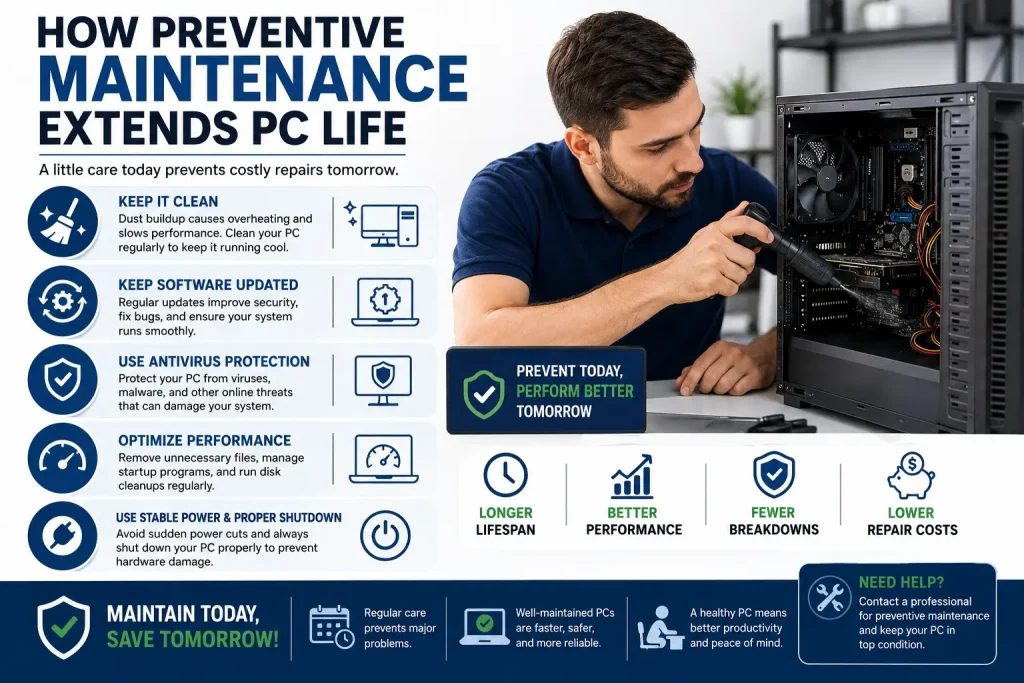
Preventive maintenance reduces the likelihood of expensive failures.
Important Maintenance Tips
Keep Your Computer Clean
Dust buildup affects airflow and cooling. Consequently, overheating can damage internal components.
Update Software Regularly
Software updates improve:
- Security
- Stability
- Compatibility
As a result, your system performs more reliably.
Use Antivirus Protection
Cybersecurity threats continue increasing every year. Therefore, antivirus protection is essential for personal and business devices.
Avoid Physical Damage
Using protective cases and proper handling reduces accidental damage significantly.
Why Businesses Need Reliable Computer Repair Services
Businesses depend heavily on technology for daily operations. Consequently, downtime directly affects productivity and revenue.
Professional computer repair services help businesses:
- Minimize downtime
- Protect sensitive data
- Maintain network security
- Extend hardware lifespan
- Reduce IT costs
At Creative IT, businesses can access professional IT support and computer repair solutions tailored to operational needs.
Final Thoughts
Searching for computer repair near you does not always mean your device needs replacing. In many situations, professional repairs, upgrades, and maintenance can restore performance while saving substantial money.
Moreover, repairing your PC is often faster, more affordable, and environmentally friendly compared to buying a new computer.
However, if your system is outdated, unsupported, or experiencing repeated hardware failures, replacement may become the better long-term solution.
Before making a decision, consult experienced professionals who can properly diagnose the issue and recommend the most cost effective option.
Whether you need hardware upgrades, virus removal, data recovery, or laptop repair services, Creative IT provides reliable support to help keep your systems running smoothly.
Read More: The Hidden Benefits of Buying Refurbished Computers for Work or Study.
Based in the Midlands? Creative IT offers fast, no-fix-no-fee computer repair in Mullingar — laptops and desktops, all brands, with a 12-month warranty. Not local? We do nationwide mail-in repair too.
FAQ’s
If the repair cost is significantly lower than buying a new device and your computer still supports modern software, repair is usually the better option.
Yes. RAM and SSD upgrades can dramatically improve speed, multitasking, and overall performance without replacing the entire system.
Most modern computers last between 5 to 8 years depending on usage, maintenance, and hardware quality.
Yes. Continuous overheating can damage internal components like the CPU, motherboard, and graphics card if not addressed quickly.
Yes. Professional technicians reduce the risk of data loss, hardware damage, and incorrect installations.
Computer repair services may include:
Virus removal
Hardware replacement
Data recovery
Laptop screen repair
SSD and RAM upgrades
Software troubleshooting
Operating system installation